Editing a Sequence


BimSens Sequence Edit allows you to edit multiple items in a defined ordered with a numbering sequence.
To start a Sequence Edit, select one or multiple items in 3D or in the Grid, right click one of the item in the Grid and click Sequence Edit. The Sequence Configuration dialogue opens.
 .
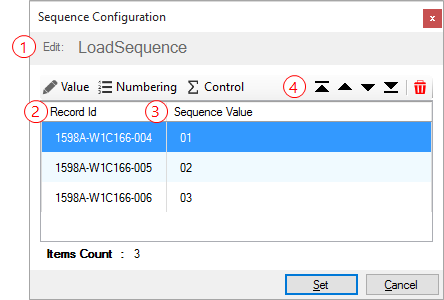
. values to ensure that you are editing the right items. You can still add items by selecting elements in BimSens's main grid or in 3D if an ID Match is defined. The Record Id is automatically provided by each DataView type and can vary depending on the DataView. For instance the Record Id in a SQL DataView is the ID Column as defined in the writing permission, while the Record Id for an Excel DataView is the row index, starting at 0.
 is the value that will be given to each record, it is automatically calculated based on the record position in the sequence. You can reorder or remove records from the sequence using the Ordering Buttons
 .
.
|
|
By default the sequence value is a double digit number starting at 01. You can configure the sequence numbering with a Base Value, a Numbering Scheme and a Control Property |
|
Changing the Base Value allows you to define a prefix or suffix for the sequence number.
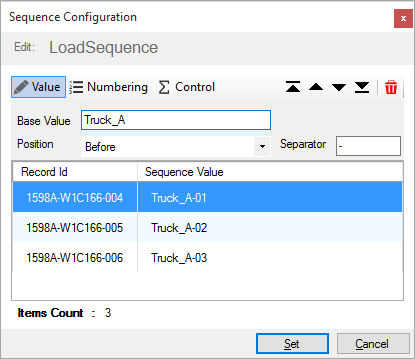
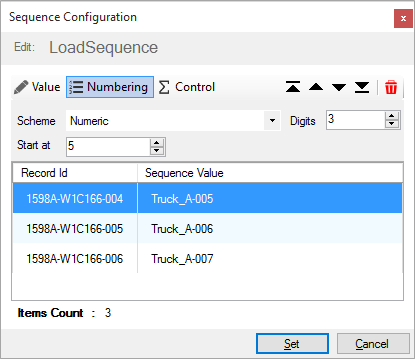
You can change the sequence number by changing the Numbering Scheme.
|
|
Note that The Digits property only applies to property that are stored as text: if you are editing a property that is numeric, for instance a SQL Decimal, the Digits property will have no effect since the SQL DataView will automatically truncate the leading zeros and convert the number 001 for instance, to its decimal value: 1.0 |
|
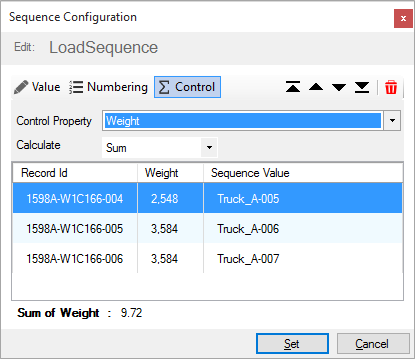
The Control Property can be used to monitor a summary value such as the sum or the average of all records in the sequence.
For instance if you are assigning pre-cast components to a truck you may want to check that the total weight does not exceed the maximum load.