Upgrade
Upgrading the MoQu
MoQu is updated automatically when BIMSens is updated.
Some updates may add features that require an update of the MoQu project file MoQu.bsxp and/or of the supporting database.
The MoQu database manager utility and Navisworks plugin will warn of optional and required update, and allow easy upgrade.
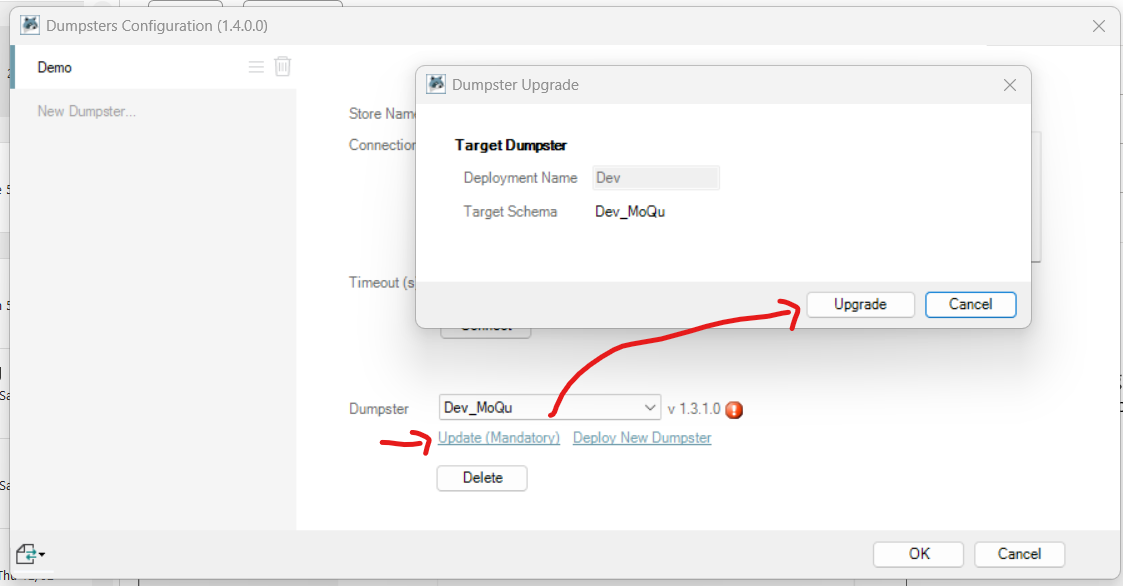
- Check the details of the update under the warning icon

- Click the Update link to open the Upgrade dialogue
- Check the details and click the Upgrade button
- The database structure is updated and rolled back safely with a detailed message if any issue is encountered.
Alternatively, to execute the upgrade as part of a wider change process, you can export the database upgrade script by holding the Ctrl button when clicking Upgrade, and save the SQL script to a file.
A newer version of the BIMSens project MoQu.bsxp may also be installed by the BIMSens update, in the C:\ProgramData\MoQu\ folder.
You may use this version of the project independently, for instance to connect to separate Dumpters, or import the configurations from the previous version of the project; refer to the Configurations section of BIMSens online help for more information.
Next